
Call Control. Call Blocker
Call Control LLCCommunication
3.935.93K Reviews
- Version
- 2.15.15
- Installs
- 5.00M
- Age Rating
- Everyone
Screenshots

Our Review of Call Control. Call Blocker
 Analysis by Appyee
My phone is supposed to help me stay reachable, but spam calls can make that feel like a chore. I want to answer people I know without bracing for another interruption, and I don’t want to spend every quiet moment sorting through suspicious numbers. That’s the everyday problem Call Control: Call Blocker is built around: giving me more say over which calls deserve my attention.
It’s a communication app from Call Control LLC, and its focus is practical rather than flashy. The aim is to reduce the noise around calls and texts so the phone feels more like a tool I control, not a doorbell that anyone can ring. That distinction matters most if unknown callers have started changing how quickly you answer even familiar numbers.
A calmer rhythm for incoming calls
What I value in a blocker is not simply the number of calls it catches. It’s the change in habit: fewer interruptions to react to, less hesitation before answering a legitimate call, and less time spent wondering whether an unfamiliar number is worth picking up. A tool like this works best when it quietly supports that routine rather than asking me to manage it all day.
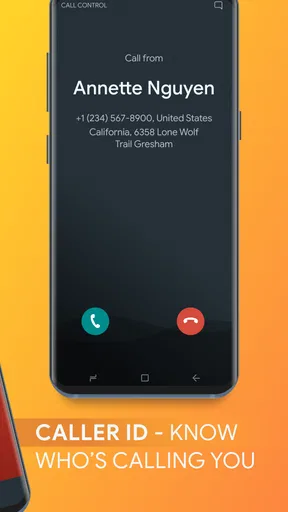
The app’s broader purpose also includes SMS blocking and caller identification, which makes it relevant to people dealing with unwanted contact across more than one channel. I’d still treat any identification or blocking decision as a helpful signal rather than an infallible verdict. A call from an unfamiliar number may be important, and a real person can occasionally be caught in a broad filtering rule.
Making the setup fit your routine
The first useful decision is how strict you want to be. Someone who gets repeated nuisance calls may prefer automatic filtering, while a person expecting calls from clients, delivery drivers, clinics, or schools may want to begin cautiously and review what happens before tightening the rules. I’d think about the calls I cannot afford to miss before enabling broad blocking, rather than choosing the most aggressive setting simply because it sounds reassuring.
That caution is especially useful when considering rules based on an area code or other broad patterns. A rule that cuts down a burst of unwanted calls can also affect legitimate callers who happen to share that pattern. If I were using one, I’d apply it only when there was a clear reason, then check the call history for anything I didn’t expect to lose. Filtering should give you breathing room, not make you harder to reach by accident.
How it fits alongside the phone’s own tools
Most phones already offer basic ways to silence or block numbers, and those tools can be enough if the problem is one persistent caller or a short list of people you never want to hear from. Call Control makes more sense when the nuisance is ongoing and you want caller identification, community reporting, and a more organized way to handle repeated unwanted contact. It’s a different choice from simply turning on Do Not Disturb, too: silencing everything may protect your focus, but it can also hide the calls you actually want.
I would not treat a blocker as a substitute for sensible call habits. If a number looks unfamiliar and the call is not urgent, letting it go to voicemail gives me a chance to decide on my terms. If a message claims to come from a bank or service provider, I’d contact that organization through a number I already trust rather than rely on caller ID alone. The app can help reduce interruptions, but it cannot make every unknown caller safe or every missed call unimportant.
Who will get the most from it
This approach is a good fit for people whose phones are repeatedly interrupted by suspected spam, especially if they want to spend less time manually blocking each new number. It may also suit someone who shares a phone with family and wants a clearer routine for reviewing unwanted calls. On the other hand, if you rarely receive nuisance calls, prefer to make every filtering decision yourself, or rely on frequent calls from new and unsaved numbers, the phone’s built-in controls may feel simpler and less intrusive.
There is also a trade-off in relying on a shared reporting system: its usefulness depends on the quality and timeliness of reports, and a number’s reputation is not the same as proof of who is calling right now. I’d keep that in mind when deciding whether to block automatically or use identification as a prompt to pause. The practical tip is to review your blocked-call history after changing a rule, particularly if you are expecting a call you have not received before.
Call Control is free to download, with in-app purchases available from $2.99 to $29.99 per item. It has a 4.0 average from around 112,000 ratings and more than 5 million installs, so it is an established option rather than an obscure utility. The app is rated for Everyone, was released on November 20, 2010, and its current version is 2.15.14, with Android 8.0 as the minimum operating system. Those details help set expectations, but the key question for me is whether its filtering style suits the calls I need to receive.
A realistic way to try it is during an ordinary week when nuisance calls are making you avoid answering altogether. Start with a measured approach, keep an eye on the call history, and note whether important unfamiliar callers still get through. If the balance feels right, you can make filtering more assertive; if it creates uncertainty, loosen the rules and rely more on your own review. That small, deliberate test is more useful than assuming that any blocker will know which calls matter to you.
Getting Started with Call Control
Installing Call Control: Call Blocker was a breeze. I found it on the Google Play Store, downloaded it, and within minutes, I was diving into the setup. The app guides you through enabling permissions, which is straightforward and ensures that all unwanted calls meet their match.
Features That Stand Out
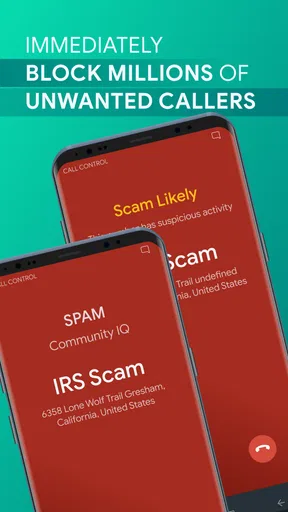
One of the first things I noticed was the extensive list of blocked numbers. Call Control taps into a crowd-sourced database, which means that every user contributes to keeping the list updated. It's like a community effort to combat the nuisance of spam calls. The app also lets you add numbers manually, which came in handy for those repeat offenders who somehow slip through the cracks.
Automatic blocking is another win. The app identifies and blocks spam calls without me having to lift a finger. I also appreciated the option to block entire area codes. If you’re getting bombarded by calls from a specific region, this feature is your best friend.
Personalizing Your Experience
Customization is where Call Control really shines. You can set up different blocking modes, like “Do Not Disturb,” which is perfect for when you need some peace and quiet. The app also offers a whitelist feature, ensuring that important calls from friends and family always get through.
The interface is user-friendly, with a clean design that makes navigation a breeze. I found the settings easy to adjust, and the fact that the app runs smoothly in the background meant it didn’t sap my phone’s battery life, which is always a plus.
Beyond Just Blocking
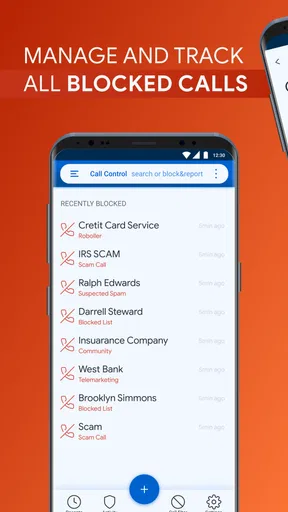
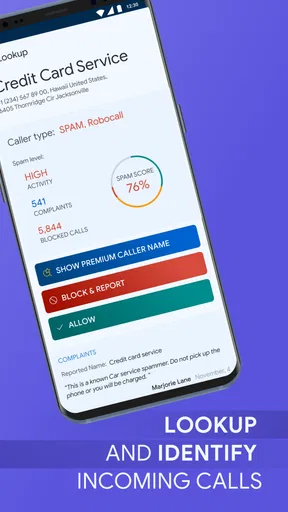
Call Control goes beyond just blocking calls. It provides detailed call logs, so you can see what’s been blocked and when. The app also offers a reverse lookup feature for those numbers you’re curious about.
What truly sets this app apart is its community involvement. Users can report numbers, contributing to the database and helping others avoid those same annoying calls. It’s like a neighborhood watch for your phone.
Is It Worth It?
So, is Call Control worth the download? In my experience, absolutely. The combination of automatic blocking, community-driven updates, and customization options makes it a robust solution for dealing with spam calls. While there’s a premium version available, the free version offers plenty of features to keep your phone free from unwanted interruptions.
If robocalls have you pulling your hair out, give it a try. It’s like having a personal guard on standby, ensuring that only the calls you want get through. With its easy setup, seamless integration, and effective blocking capabilities, it’s an app that’s hard not to love.
Verdict
Strengths of Call Control. Call Blocker
- Effective spam call blocking.
- User-friendly interface.
- Customizable block list.
- Minimal battery usage.
- Regular database updates.
Limitations of Call Control. Call Blocker
- Ads in free version.
- Limited features without premium.
- Occasional false positives.
- Requires internet for updates.
- No SMS blocking feature.
Similar Picks in This Category
View All
Google Messages
Google LLC4.6

Gmail
Google LLC4.1

Google Meet
Google LLC4.4

Google Chrome
Google LLC4.1

WhatsApp Messenger
WhatsApp LLC4.6

Carrier Services
Google LLC4.2
Frequently Asked Questions
What is Call Control and how does it work?
Call Control is a powerful call blocking application designed to help users manage unwanted calls and texts. It uses a combination of community reports and a personal blacklist to identify and block spam calls. The app automatically blocks known spam numbers and allows users to customize their blocking settings for additional control.
Is Call Control available for both Android and iOS devices?
Yes, Call Control is available for download on both Android and iOS platforms. The app can be easily found on the Google Play Store for Android users and the Apple App Store for iOS users, making it accessible to a wide range of smartphone users.
Does Call Control offer any premium features?
Call Control offers a premium version with additional features such as enhanced caller ID, personal blacklist management, and advanced spam protection. While the basic version is free and effective for general use, the premium version provides a more comprehensive set of tools for users looking to maximize their call blocking capabilities.
How effective is Call Control in blocking spam calls?
Call Control is highly effective in blocking spam calls, thanks to its community-driven database and regular updates. Users report a significant reduction in unwanted calls and texts. The app’s effectiveness is enhanced by its smart algorithms that adapt to new threats, ensuring users are protected against the latest spam tactics.
Can I customize which calls are blocked by Call Control?
Yes, Call Control allows users to customize their blocking preferences. Users can create a personal blacklist to block specific numbers, and adjust settings to block calls from unknown numbers or specific area codes. This flexibility ensures that users can tailor the app’s functionality to suit their specific needs and preferences.
